
Services
Audio-Visual Resources
Read More
◆Online Video Databases
◆ Public Performance AV Resource List (click to view)
Borrowing Guidelines for Public Performance AV Resources:
- Eligibility: Only NFU faculty and staff may use for teaching or official activities
- Quantity & Loan Period: 2 items / 7 days
- Procedure: Contact the staff in charge (ext. 5045, Ms. Chang) before borrowing. Upon confirmation, present your faculty/staff ID at the circulation desk on the 1st floor.
- Return: Must be returned at the 1st floor circulation desk during library hours; do not use the return box. Borrowers are responsible for any damage.
- Note: Late returns and damages are handled according to the "NFU Library Collection Loan & Compensation Regulations."
Borrowers must comply with intellectual property regulations.
Network Services
Read More
The library provides wired and wireless internet access throughout 1F/2F/3F/4F/5F. Users may bring laptops or PDAs to access the network.
■ Wired Internet Access:
(1) 1F: 21 computers, follow library computer usage regulations.
(2) 2F: 2 computers, follow library computer usage regulations.
(3) 3F: 1 computer, follow library computer usage regulations.
(4) 4F: 2 computers, follow library computer usage regulations.
(5) 5F: 10 computers, follow library computer usage regulations.
■ Wireless Internet Access:
(1) SSID: NFU; login requires student/staff credentials.
(2) Use in open areas due to potential signal obstruction.
(3) WiFi is maintained by the University Computing Center. For issues, contact the Network Section of the Computing Center.
Online Renewal Guidelines
Read More
Online Renewal Guidelines
Renewals must follow these rules; otherwise, renewal is not allowed:
(1) If no one has reserved the item, renewal may be made starting 5 days before due date, limited to four times.
(2) Borrowers with overdue items cannot renew. Overdue items appear in red in "My Borrowed Items."
(3) Check the updated due date after successful renewal.
(4) For issues, contact the circulation desk or call 05-6315041.
Renewal Steps
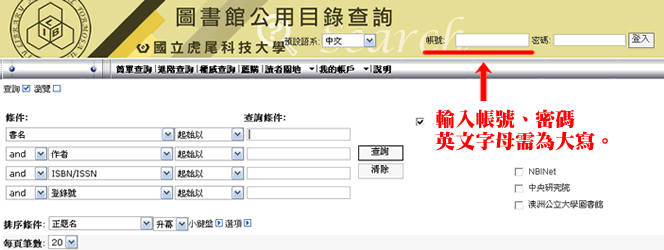
1. Log in to the Library Public Catalog with your account (ID: student number; default password: National ID number; uppercase letters required).
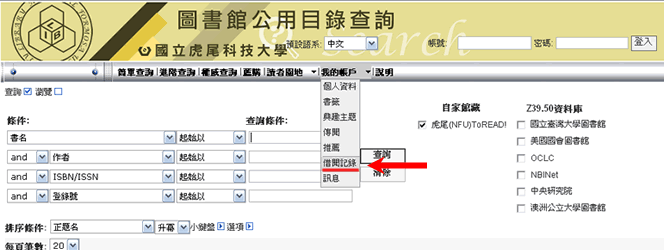
2. Go to My Account → Borrowed Records
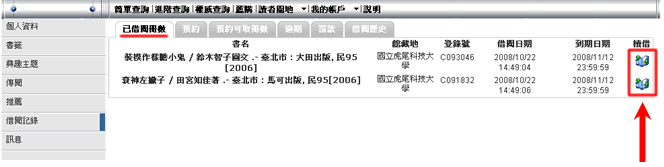
3. In "Borrowed Items," check current items and click "Renew" as needed.
Online Reservation
Read More
Notes
(1) Items can only be reserved if currently borrowed. Once the reserved item arrives, an email notification is sent. Users can update email info in the system.
(2) Reserved items are held for 1 week. Unclaimed items are returned to shelves.
(3) Inform the circulation staff when picking up reserved items.
Steps
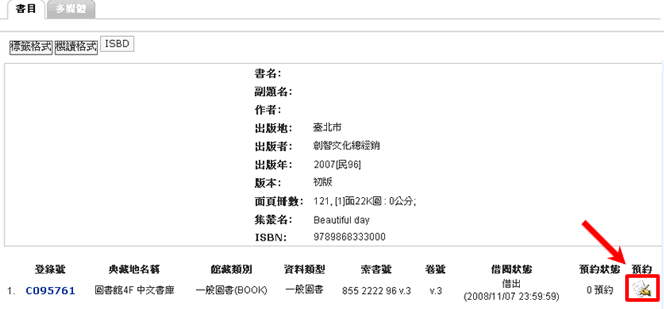
(1) Search for the book in the library catalog.
(2) Click the reserve option (see image below).
(4) If your email is correct, you will be notified when the book is returned.
Cancel Reservation
Read More
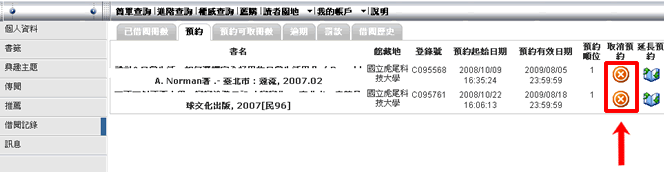
Go to My Account → Borrowed Records → Reservations, click the "Cancel Reservation" button to successfully cancel your reservation (see image below).
New Books Notification
Read More
Notes
(1) New books added each month can be found in the New Books Notification system.
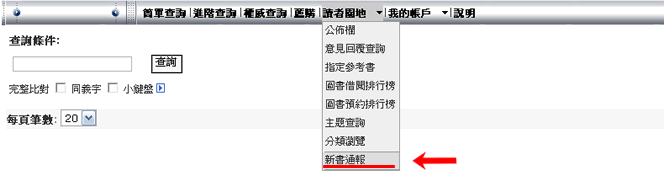
(2) Go to "Reader's Zone → New Books Notification," select the month to view new books.
Book Recommendation Guidelines
Read More
- All NFU faculty, staff, and students may log in to the Library System to recommend books.
- Book procurement occurs in two stages: (A) Each semester, recommendations from departments are processed; (B) Remaining budget is used for ad-hoc procurement.
- Recommended books are accumulated and reviewed before purchasing through quotations.
- The process from recommendation, procurement, arrival, cataloging, barcode tagging, to shelving takes several weeks to months.
Recommendation Steps
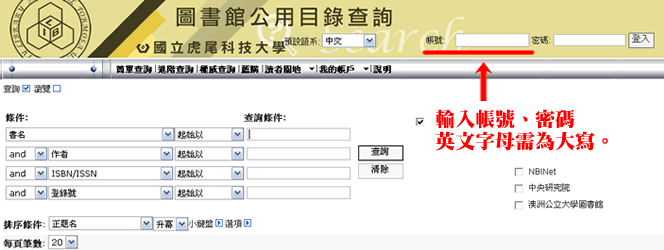
1. Log in to the Library Public Catalog (ID: student number; default password: National ID number, uppercase letters required).
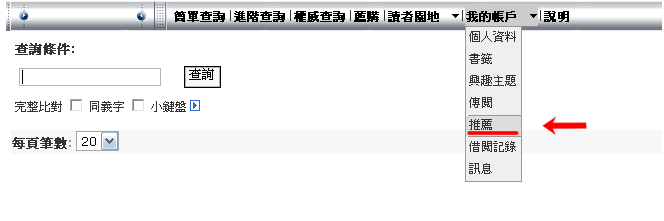
2. My Account → Recommendations → Add Recommendation
3. Fill in the book information.
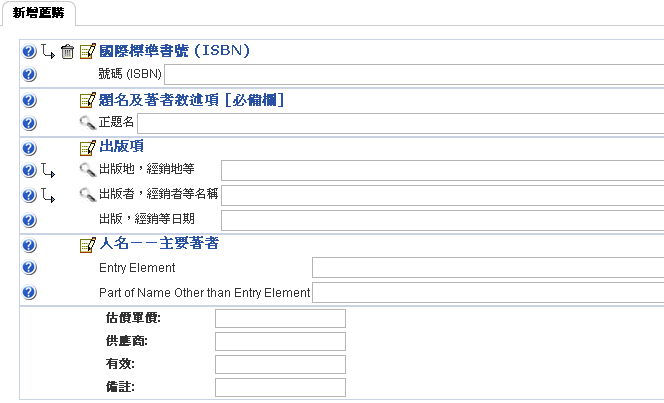
4. Save the entry.
5. Check "Recommendations" to view the current list.